The AI-native developer workspace
Your workspace. Your way.
Everything developers need. One flow.
An AI agent that works where you work, a terminal with IDE-level completions for git, docker and npm, then a code editor, an API client and a drawing board — each one shortcut away. Free, open source, and it never phones home.
curl -fsSL https://raw.githubusercontent.com/code4mk/figyterm/main/install.sh | shmacOS one-liner · Linux & Windows · No account, ever · MIT licensed
 zsh+
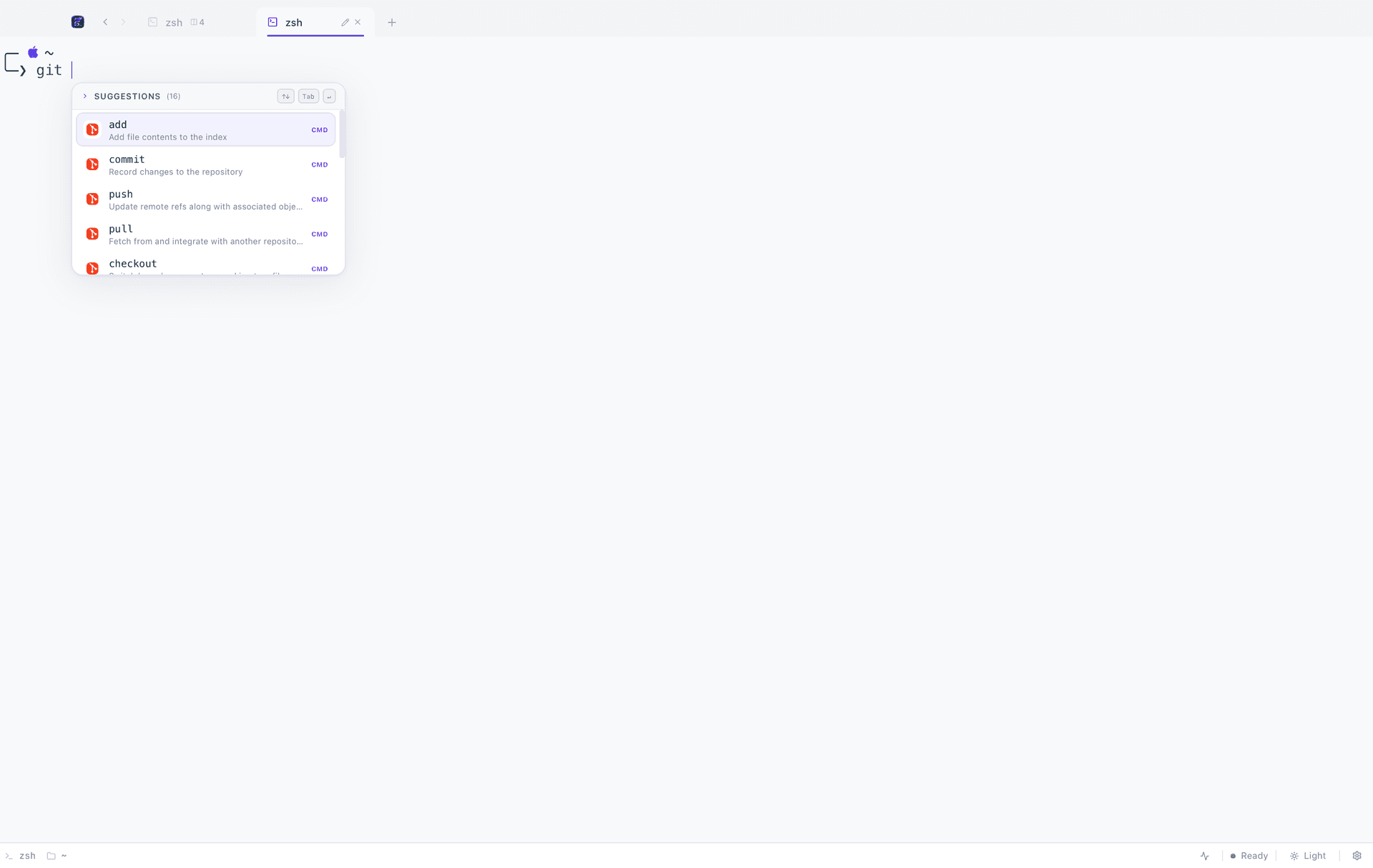
 pullFetch from and integrate with another repositoryCMD
- pushUpdate remote refs along with associated objectsCMD
- commitRecord changes to the repositoryCMD
- checkoutSwitch branches or restore working tree filesCMD
- Local — nothing leaves your machine
- 100%Local — nothing leaves your machine
- Tools in one window
- 7Tools in one window
- Trackers, accounts or sign-ups
- 0Trackers, accounts or sign-ups
- Platforms — macOS, Linux, Windows
- 3Platforms — macOS, Linux, Windows
Local by default
Completions, indexes, history and collections are computed and kept on your machine. No accounts, no telemetry, no analytics — the only request Figylo makes on its own is an update check against GitHub Releases.
Native, not a web app
A Tauri 2 shell with a real PTY behind it. Input has no perceptible latency, memory stays measured in tens of megabytes, and every heavy panel loads the first time you open it — never at launch.
Open source, forever
MIT licensed and developed in public, design notes and all. Read the code that runs your shell, file an issue, or ship a completion spec for your own CLI in a single pull request.
Services
Seven services, one window, no tab-switching
Figy Harness, Figy Terminal, Figy Code Editor, Figy Man, Figy Drawing, Figy Browser and the Claude Code window — each behind one shortcut, and none of it loaded until you open it.
- Preview
Figy Harness
An agent written for this app rather than wrapped from outside it. The loop, the tools, the permission model and the token ledger live in the Rust backend, and the agent reaches only the folders you granted it.
Read more - New⌘ ⇧ A
Claude Code window
The `claude` CLI exactly as it ships, in a child window Figylo draws the frame around. Projects are a primary folder plus any extras, and every conversation keeps running while you work elsewhere.
Read more Figy Terminal
A Rust PTY backend behind xterm.js rendering: up to four panes per tab, drag-to-reorder tabs, fuzzy history search, live CPU and memory charts, and a command palette that spells every shortcut for the platform you are on.
Read more- ⌘ ⇧ E
Figy Code Editor
Click a path in terminal output and the file opens at that line. Saves are atomic, conflicts are detected rather than silently lost, and line endings survive untouched.
Read more - New⌘ ⇧ H
Figy Man
Requests are sent from Rust, not the webview, so the headers, redirect chains and timings are real. Collections and history live in SQLite on your machine, and the industry-standard interchange format round-trips losslessly.
Read more - New⌘ ⇧ X
Figy Drawing
Sketch the architecture you are about to build without leaving the terminal. A project is a canvas and its notes together — both autosave, both are searchable, and there is no Save button to forget.
Read more - ⌘ ⇧ B
Figy Browser
Documentation lives one shortcut away instead of one window away. Because it is a genuine child webview rather than an embedded frame, sites that refuse to be framed load normally.
Read more
Screenshots
See it before you install it
Real captures from the app — no mockups, no marketing renders. Taken on macOS; the same features ship on Linux and Windows.
Suggestions that understand the command
Type git and Figylo knows the subcommands, their descriptions and your branches. Tab accepts, arrows navigate, Esc dismisses.
About Figy TerminalAutocomplete · 1 of 8
One flow
Everything developers need. One flow.
Not a terminal with plugins bolted on, and not a browser tab per tool. Seven services in one native window, one shortcut each, one set of projects — and nothing loaded until the moment you open it.
Privacy
Local is not a feature here, it's the architecture
There is no server to opt out of. Everything the app computes, it computes on your machine.
No telemetry, no analytics
Nothing measures you. There is no event pipeline to opt out of, because there is no event pipeline.
No account, ever
Nothing to sign up for and nothing to sign in to. The app has no concept of a user.
Offline by design
Completions, indexes, history and collections are computed and stored locally. The one request the app makes on its own is an update check.
Auditable
MIT licensed, with the design notes for every major panel committed alongside the code.
Install
Running in under a minute
One command on macOS, one on Linux, one installer on Windows. You install once — Figylo updates itself from then on.
curl -fsSL https://raw.githubusercontent.com/code4mk/figyterm/main/install.sh | shFAQ
Questions people actually ask
The short list. The rest — platform quirks, package formats, the editor's save guarantees — is on the FAQ page.
What is Figylo?
Figylo is a free, open-source AI-native developer workspace for macOS, Linux and Windows. It puts an AI agent window, a native terminal with IDE-level autocomplete, a code editor with git and language servers, a REST API client, a drawing board and an embedded browser in a single window — one shortcut each, and all of it running on your own machine. It is built with Tauri 2, Rust and React.
Does Figylo send my commands anywhere?
No. There is no telemetry, no analytics and no account system. Autocomplete is computed locally by the Rust backend, so your commands, paths and history never leave your machine. The only network request the app makes on its own is checking GitHub Releases for an update.
Which platforms are supported?
macOS on Apple Silicon (aarch64) and Intel (x64), Linux on x86_64, and Windows on x64. macOS ships a .dmg, Linux ships an AppImage plus .deb and .rpm packages, and Windows ships an NSIS installer plus an .msi for managed deployment. Windows on ARM and Linux on aarch64 aren't built yet.
Do all the features work on every platform?
Almost. Autocomplete, panes, tabs, history search, the system monitor, the command palette, the embedded browser, the code editor, the API client, the Claude Code window and the drawing board work everywhere. The one exception is the Oh My Zsh theme picker, which reads ~/.zshrc and so only applies where zsh does — macOS and Linux. On Windows the equivalent would be Oh My Posh, which Figylo doesn't manage yet.
Does all of this make it slow to start?
No, because none of it loads at launch. The editor, browser, API client, Claude window and drawing board are each loaded the first time you open them, so a session that only uses the terminal pays for the terminal. The base app is a Tauri 2 binary of around ten megabytes with a Rust PTY behind it.
Give your terminal its whole workbench
Free, MIT licensed, and entirely local. On macOS one command does it; Linux and Windows are one download away.
curl -fsSL https://raw.githubusercontent.com/code4mk/figyterm/main/install.sh | sh