Figy Code Editor
A real editor over the shell — CodeMirror 6, file tabs, a file tree, a fuzzy finder and project-wide search, one shortcut away.
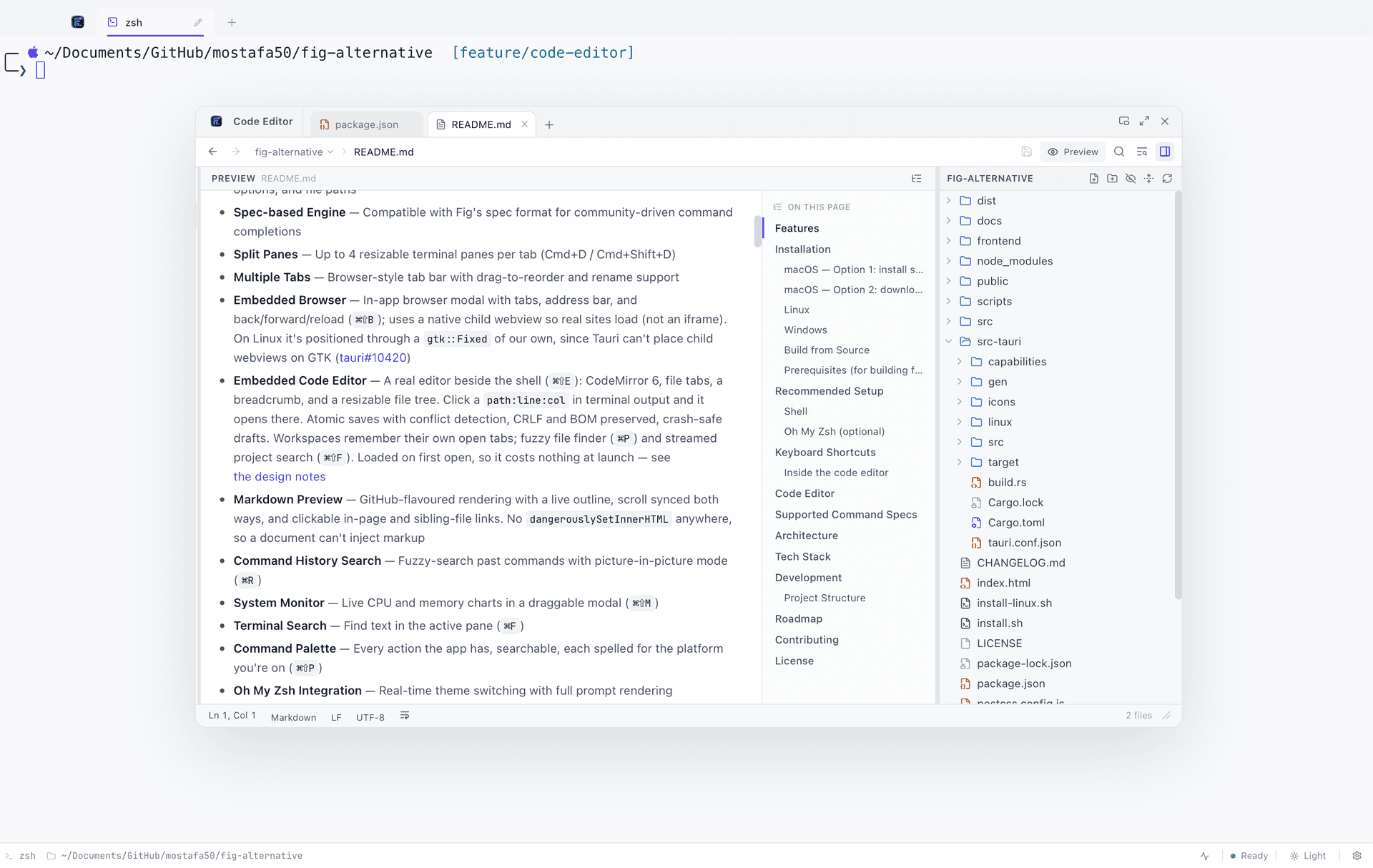
Straight from a stack trace
A `path:line:col` in terminal output is clickable. One click opens the file in the editor with the cursor already on the offending line.
Saves you can trust
Written to a temp file and renamed over the target, so a crash cannot leave half a file. CRLF and byte-order marks are written back exactly as found.
Find anything
⌘P fuzzy-matches a file from a few letters. ⌘⇧F streams project-wide results as they arrive rather than making you wait for the whole scan.
Tick, summarise, commit
File-level staging in a panel shaped like GitHub Desktop's. Tick what belongs in the commit, write the summary, commit.
A diff you can read
Unified or split, with word-level highlighting inside changed lines, and five presets so it looks like the diff tool you already know.
Your git, not a reimplementation
It shells out to the git on your PATH, so your hooks, your config and your credential helper all apply exactly as they do on the command line.
Real diagnostics
Errors and warnings from an actual type checker, underlined in the buffer and listed with the message the compiler gave.
Go to definition
F12, or ⌘-click the symbol. Cross-file, because the server has indexed the project rather than guessed from the open buffer.
Nothing bundled
Figylo starts the servers you already have. No download on first launch, no per-language install story it owns, and no daemon if you never opt in.
The shape of it
File tabs across the top, a breadcrumb under them, and a resizable file tree — the layout an editor is expected to have, over the shell rather than instead of it. Each workspace remembers its own open tabs, so reopening the editor in a project puts you back where you left it. It is loaded the first time you open it, which is why it costs nothing at launch.
- CodeMirror 6
- Multi-cursor, folding, bracket matching and per-language highlighting across the languages the editor ships grammars for.
- File tree
- Resizable, with git status badged onto changed files.
- Quick open
- ⌘P and a few letters — `edmod` finds `EditorModal.tsx`.
Markdown, rendered
GitHub-flavoured rendering with a live outline beside it, scrolling synced both ways, and links that follow through to sibling files. Handy for the README you were about to open in something else. No `dangerouslySetInnerHTML` anywhere in the path, so a document cannot inject markup into the app.
Markdown preview
Figylo rendering a Markdown document beside its live outline, with scrolling synced between them
public/screenshots/markdown-preview.pngSearch across the project
⌘⇧F searches the whole project and streams matches in as they are found, grouped by file. Results are live-updating rather than a frozen list, so a large repository stays usable while the scan is still running.
Project search
Streamed project-wide search results in Figylo's editor, grouped by file
public/screenshots/project-search.pngBuilt carefully, because it writes to your disk
This is the part that got the most attention, because an editor that loses work is worse than no editor.
- Atomic saves
- Written to a temp file and renamed over the target. A crash mid-save cannot leave a half-written file.
- Conflict detection
- Every save carries the timestamp the file was opened at. If something else changed it meanwhile you are offered overwrite, reload or cancel — never a silent loss.
- Bytes preserved
- Line endings and byte-order marks are written back exactly as found, so a one-line edit stays a one-line diff on Windows.
- Crash-safe drafts
- Unsaved buffers are journalled while you type and offered back after a crash.
- Deletes go to the trash
- Not to nowhere.
Git, without a second application
Staging, committing, the diff viewer and the commit history are part of the editor, reading the same working tree you are typing in. Nothing here reimplements git — it runs the one on your PATH.
Status where you are already looking
Changed files are badged in the file tree and changed lines are marked in the gutter, so the state of the working tree is visible while you edit rather than something you stop to ask for. The status bar carries the current branch.
Git panel
The git panel in Figylo's editor with changed files ticked for staging and a commit summary typed
public/screenshots/git-panel.pngA diff viewer with five faces
Everyone has a diff they read fastest. Rather than pick one, the viewer ships presets for GitHub, GitLab, VS Code, delta and plain `git diff`, in unified or split layout, with word-level highlighting inside changed lines so a renamed variable does not look like a rewritten paragraph.
Diff viewer
Figylo's split diff viewer with word-level highlighting inside the changed lines
public/screenshots/diff-viewer.pngHistory, and the two remote operations worth having
A history tab lists commits; opening one slides out a drawer with its message and the files it touched. Fetch and push are there. Discards go to the system trash rather than into nothing.
- Built
- Tree decorations, gutter marks, branch indicator, file-level staging, commit, history drawer, fetch, push.
- Not built
- Hunk-level staging, branch switching and pull. Those stay on the command line, where you already have them.
Commit history
The commit history tab in Figylo's editor with a commit opened into a drawer listing its files
public/screenshots/git-history.pngLanguage servers, when you want them
Real diagnostics, hover documentation, go-to-definition and rename, from the servers already installed on your machine. Opt-in, so a terminal still starts instantly.
Why it is opt-in
A language server is not free. `rust-analyzer` on a repository of any size is a gigabyte or more resident and minutes of indexing before it answers anything — and Figylo is a ten-megabyte terminal that starts instantly, which is the same argument that ruled out bundling a heavier editor. So the servers are yours, they start when you ask for them, and a session that never opens a file never pays for one.
Diagnostics
A language server diagnostic underlined in Figylo's editor with the error message in a hover card
public/screenshots/lsp-diagnostics.pngWhat you get once it is on
The things you cannot answer from syntax highlighting alone — what this symbol is, where it came from, what you just broke.
- Diagnostics
- Underlined in the buffer, with the message in a hover card.
- Hover
- Type signature and documentation for the symbol under the cursor.
- Completion
- Type-aware, rather than word completion from the open file.
- Go to definition
- F12, ⌥⌘↓, or ⌘-click — cross-file.
- Rename
- Across the project, not a find-and-replace.
- Quick fix
- ⌘. on a diagnostic the server offers an action for.
Hover & definition
A hover card in Figylo's editor showing a symbol's type signature and documentation
public/screenshots/lsp-hover.pngAnd when there is no server
Plenty of languages have no server worth installing, and the editor stays useful in them. Syntax highlighting, folding and word completion come from the syntax tree CodeMirror already parses on every keystroke — and the single most valuable diagnostic source is still the build you just ran in the pane below, whose output is clickable straight to the line.
FAQ
Figy Code Editor, in short
Is the built-in editor meant to replace my IDE?
No, and it does not pretend to. It is for the edits you would otherwise break flow for — patch a config, fix the line a stack trace just pointed at, read a README. There is no debugger and no test runner. Your editor keeps your project; this one keeps you in the terminal.
Does it have IntelliSense?
Optionally. Word completion from the open document works with no setup, and language server support adds real diagnostics, hover, completion, go-to-definition and rename using servers you already have installed.
Does opening the editor slow the terminal down?
No. The editor is loaded the first time you open it, not at launch, so a session that never opens it never pays for it.
Does it use my git configuration?
Yes. Figylo runs the git on your PATH rather than reimplementing it, so your hooks, aliases, signing configuration and credential helper all apply.
Can I stage individual hunks?
Not yet — staging is file-level. Hunk-level staging, branch switching and pull are deliberately left to the command line for now.
What happens to a discarded change?
The file goes to the system trash, not to nowhere. A discard you regret is recoverable.
Which language servers are supported?
The ones you install. Figylo speaks the Language Server Protocol and launches the server you point it at, so anything protocol-compliant works. Nothing is bundled and nothing is downloaded on your behalf.
Will this slow the terminal down?
Only while a server is running, and only in the editor. Language server support is off until you turn it on, and the server starts when a matching file is opened rather than at launch.
Is there IntelliSense without a language server?
There is word completion drawn from the open document, plus highlighting, folding and bracket awareness from the syntax tree the editor already parses. Type-aware completion needs a server.
Give your terminal its whole workbench
Free, MIT licensed, and entirely local. On macOS one command does it; Linux and Windows are one download away.
curl -fsSL https://raw.githubusercontent.com/code4mk/figyterm/main/install.sh | sh